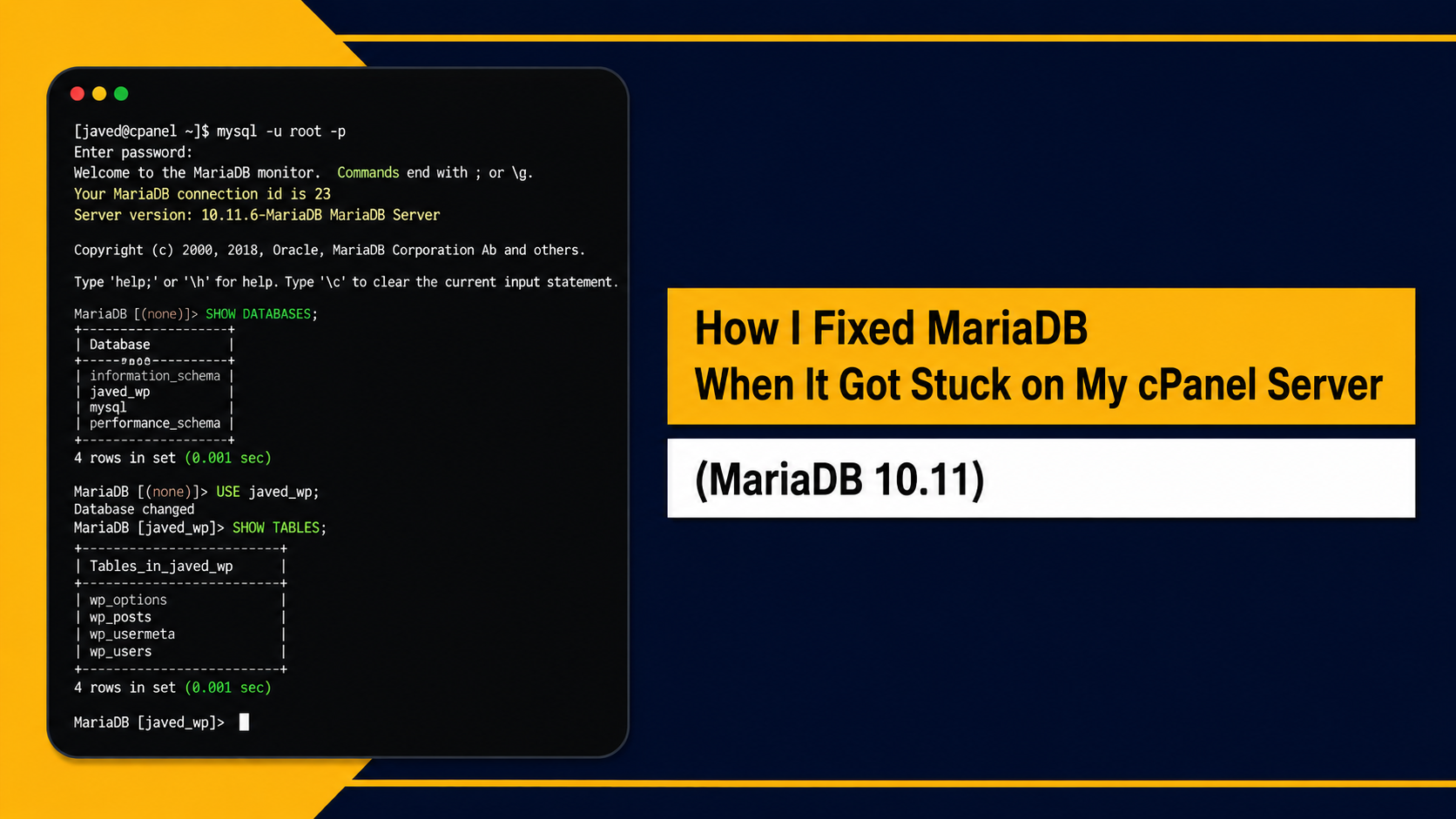
Last week I had a small panic moment. I was working on one of our production cPanel/WHM servers and suddenly noticed my database was not working. Every website on that server which use MySQL/MariaDB all stopped connecting to database. It was not fun when you see that happening on live server.
So I start digging into it, and found the real problem. MariaDB was not able to restart because one old mariadbd process was still sitting there running in background, and because of that the service got stuck in weird state. It was not fully down, not fully up, just stuck.
I am writing down here exactly what I did to fix it, step by step, in case someone else face same issue.
Server setup: AlmaLinux, cPanel/WHM, MariaDB 10.11
Step 1: Checking status first
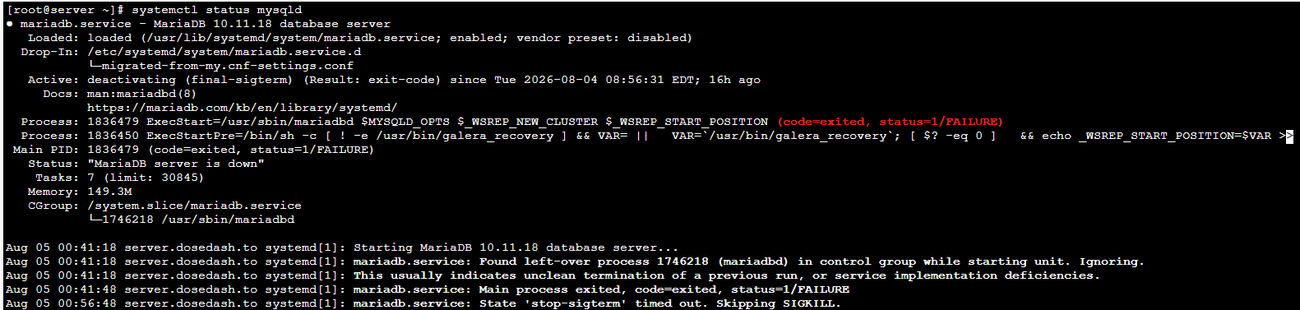
Before doing anything, always check status first. On cPanel server you use this command:
systemctl status mysqldIt says mysqld but actually on cPanel it redirect to MariaDB service, this is normal.
When I run this, the output told me few important things:
- Service was in
deactivating (final-sigterm)state - It said MariaDB server is down
- There was a “left-over process” mentioned, with a PID number
- Systemd was not able to stop the service properly
The line that really told me what’s going on was something like Found left-over process 1746218 and also State 'stop-sigterm' timed out. Basically MariaDB tried to shut down but that old process refused to die.
Step 2: Confirm the process is really running
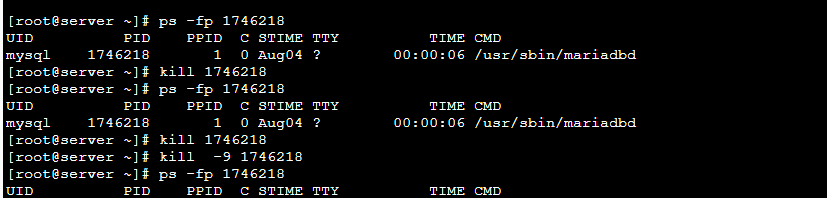
I did not want to just kill something blindly, so I checked first if that PID is actually alive:\
ps -fp 1746218Yes, it was there, still running. So now I know for sure, this is the process causing the trouble.
Step 3: Kill the stuck process
First I tried the polite way:
kill 1746218Nothing happened, process was still alive after that. So I had no choice, went for the force option:
kill -9 1746218Then checked again with ps -fp 1746218 and this time there was no output. Meaning the process was finally gone.
(Quick note: don’t jump straight to kill -9, always try normal kill first. Force kill is like last resort, not first option.)
Step 4: Delete the old PID file
Even after killing the process, MariaDB also keeps a PID file somewhere on disk, and this file was still there pointing to the process that don’t exist anymore. so i checked it like this:
ls -l /var/lib/mysql/*.pidFound the stale file, then removed it:
rm -f /var/lib/mysql/*.pid
Checked again to confirm it’s gone.
Step 5: Start MariaDB again
Now with process gone and PID file removed, I could safely start the service:
systemctl start mariadbStep 6: Double check everything is fine
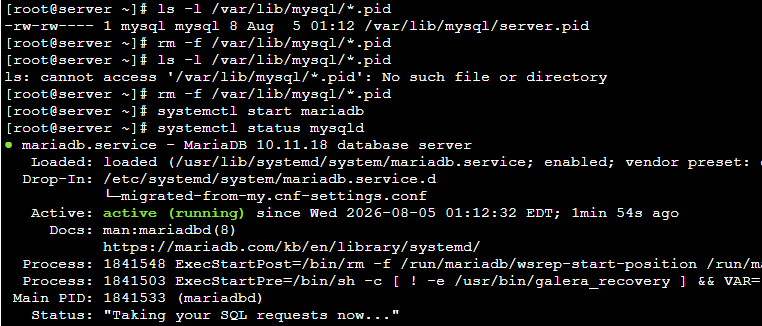
systemctl status mysqldThis time output showed Active: active (running) and message like “Taking your SQL requests now”. That’s when I knew, database is back and working properly.
What actually caused this
If I have to summarize the root cause,MariaDB didn’t shut down cleanly at some point earlier, one process from that shutdown got left behind still running, and its PID file also stayed on disk. Because of that, systemd thought MariaDB is already running (or trying to run) and refused to start it fresh.
Some things I learned from this
- Always try normal
killbefore going forkill -9 - Before deleting any PID file, make 100% sure the process is actually dead. If you delete PID file while the process is still alive, it can cause more mess.
- Never remove a PID file if MariaDB is currently running fine, only do this when service is confirmed stuck/down.
- If after all these steps MariaDB still doesn’t come up, check the MariaDB error log, it usually tells you more.
In the end
No corruption, no config issue, nothing scary like that. Just one leftover process and one stale PID file, blocking everything. Few commands, maybe 5 minutes of work, and the database was back online. no need to reboot whole server, which really matters when you have live sites running on it.
Hope this helps someone who lands on this same error one day.
One more thing : if you’re running WooCommerce on that server
If your database goes down even for few minutes like mine did, and your store is WooCommerce, that downtime also means orders and customer info might not be syncing to wherever you track them (CRM, spreadsheet, whatever you use). That’s actually the reason I started looking more into keeping WooCommerce data properly connected outside just the store database itself.
We build plugins for exactly connecting WooCommerce to CRMs so your orders and customer data stay backed up and synced in real time, not just sitting inside one database that can go down anytime. If you want to check it out, here’s our Woo Smart Pipedrive Integration. it keeps every order and customer synced to Pipedrive automatically, so even if your server has a bad day, your CRM data is safe.
If you like Woo Smart Pipedrive Integration, be sure to explore our other WooCommerce CRM integration plugins.